




Last updated October 31, 2019 – News: Teachable has introduced a course marketplace option that readers here will want to know about.
Looking to sell online courses, but confused by all of the platform choices?
In this post I draw on my two decades of eLearning industry experience to highlight the best online course platforms and help you narrow your list. It’s a great companion to my free platform selection guide.
(Psst. If you already have a platform, be sure to check out the next steps at the end of this post.)
Why is choosing an online course platform so hard (and what makes it easier)?
One of the most important things to know about choosing the best online course platform is that most platforms out there are not designed to sell online courses. They are made to deliver internal corporate training or to support academic programs.
And here’s another important fact:
Even those that will work for selling online courses come in a lot of different flavors. Pick the wrong flavor for your online course business needs and you will have headaches.
So, to help narrow your field of choices (and avoid headaches!), I’ve organized this post into the following categories.
- Standalone Platforms (Great for solo edupreneurs, small businesses)
- All-In-One Platforms (Run your Web site and course site together)
- WordPress Plug-Ins/Themes (For those who want to keep it all in WordPress)
- Marketplace Platforms (Get a pre-made market for to sell courses online)
- Small Business-Extended Enterprise (For more complex needs)
- Moodle Plug-Ins/Add-Ons (Make Moodle into a selling machine)
It may seem like a no-brainer, but just having a clear idea of which of the categories above you fall in – along with knowing that only a small subset of online course platforms are meant for selling course – will make your life MUCH easier.
Keep in mind that I think all of these are strong choices.
I have my preferences, but depending on your specific needs, any of these could be a good fit. Also, if a company offers an affiliate program, I will usually participate (here’s my affiliate disclaimer) – that doesn’t cost you anything, and I don’t see why I shouldn’t get at least a little benefit from sending some business to a company.
I have more experience with some of the online course platforms listed here than others, but I have vetted them all at a high level to make sure – based on my decades of experience – that they seem like a good fit for edupreneurs and smaller education and training businesses that want to sell online courses.
I encourage you to use the comments area to share any experiences you have had with these platforms – good or bad. (And, be sure to check them out for what others have said.)
Now, let’s move on to the list.
 All of the platforms listed here are strong choices, but I know it can be helpful for an expert to just say “look at this one, it’s a top choice” if you want to sell online courses. So, here’s my all around top choice: Thinkific.
Check it out. You can create a free course right away, they are very upfront about how their different plans compare, and most importantly, I hear consistently from readers that that they have had a good experience with Thinkific. – Jeff
Don’t just take it from me. Here is what Thinkific reviews currently look like on ReviewMyLMS.com, a source for LMS reviews from actual users:

Finally, if you decide you are interested in Thinkific, use this link to get a special package that includes a free 3-month pro+growth plan trial, $744 in training, and exclusive support.
Standalone Platforms to Sell Online Courses
These are hosted platforms geared toward solo edupreneurs or small businesses that want a turnkey way to create their own branded site to sell online courses. (Also, unlike Udemy, which is discussed below in a different category, they allow you full control over your user data.)
While the feature sets are relatively similar, they can be very different in their “look and feel” as well as in how focused they are on helping course entrepreneurs succeed – e.g., by providing good resources, educational content, strong support. Be sure to check out the free trial options, where available, so that you have a chance to kick the tires before committing.
Thinkific
Thinkific provides a truly full-featured software solution to help you create, deliver, and market and sell online courses. A big vote of confidence for this platform is that my friend Dorie Clark – a bestselling author multiple-times over, guest on the Learning Revolution podcast, and generally very smart and business-savvy person – has used it for her online courses. Similar to Teachable below, there is a free plan, but …
… get this …
… Thinkific does not charge transaction fees on any of its plans, paid or free. (You still don’t quite get to sell online courses for free because your payment processor – e.g., PayPal, Stripe – will always charge you a transaction fee.)
The Basic paid plan – which comes with a bump in the features you get access to – starts at $49 per month ($39, if paid annually). Definitely worth checking out. (Here’s my full Thinkific review.)
 If you decide you are interested in Thinkific, use this link to get a special package that includes: a free 3-month pro+growth plan trial, $744 in training, and exclusive support.
LearnWorlds
LearnWorlds seems to have a lot of momentum right now. The company positions itself as a “premium” option that provides for high interactivity, social learning tools to complement standard course content, and white labeling.
The company also puts a lot of emphasis on its tools for building sales pages for courses – and these do indeed look impressive. You can even test them out without signing up through a simulator that LearnWorlds provides.
You can try LearnWorlds free for 30 days (no credit card required), then pricing starts at $29 per month ($24, if billed annually). The company charges $5 per sale on its starter plan, but no additional fees on its other plans.
Unlike many of the company’s here, LearnWorlds also offers services for uploading and converting your content, developing courses, and customizing your LearnWorlds school. And, it is one of the few platforms on this page that supports SCORM. All in all, it looks like a very good option, deserving of the “premium” label.
Use the code LEARNINGREVOLUTION50 when checking out at LearnWorlds and you will get 50% off for the first month of a Pro plan or higher. (Full Learnworlds review here)

Teachable
Teachable got started out of frustration with Udemy (listed below) – in particular, with the way in which Udemy controls information about and access to students. In response, the Teachable team has created a platform that enables you to offer online courses “on your website and control your branding, student data, and pricing all from one place.”
I like the pricing model Teachable offers. You can use the platform for free and pay $1 + 10% for all transactions. (You’ll need to click on the Compare Plans link on their pricing page to see this option.) Or, you can choose to pay a monthly fee, which eliminates the $1 per transaction fees and also reduces the percentage paid to Teachable based on what level of monthly fee you choose.
The basic plan is $39 per month ($33.25, if paid annually + a 5% transaction fee). (Here’s my full Teachable review.)
Link: https://teachable.com/
 If you are ready to sell online courses and just want to get started fast (or already have, but are looking for new technology), be sure to check out the free Teachable Quickstart Webinar (offered weekly on Thursdays).
Podia
Podia started out as “WithCoach” and a platform that was aimed primarily at coaches. More recently, the company has repositioned as a full-featured, but easy-to-use platform for selling online courses, memberships, and digital downloads in one place. Some of its key selling points are:
- no transaction fees (other than whatever you pay to your payment processor – i.e., Paypal or Stripe),
- no limits on courses or users, and
- a strong focus on supporting affiliate marketing of your products.
With its basic plan starting at $39 per month (two months free with an annual plan), Podia seems to be rapidly gaining a lot of momentum. (Full Podia review here.)
Link: https://www.podia.com
Ruzuku
One of the things I really like about Ruzuku is that they put a LOT of effort into helping subject matter entrepreneurs use their platform successfully to sell online courses – including everything from designing a great course, getting it online, and marketing it effectively. Their “Up and Comer Plus” plan also includes unlimited Webinars. Their Bootstrapper plan is $99 per month ($74.75, if billed annually) and includes unlimited students and courses.
If you are looking for an easy-to -use platform combined with a soup-to-nuts approach to helping you be successful with it, this is a great option. I recommend you sign up for their free trial today to give you an idea of what the platform can do.
Link: http://ruzuku.com/
Click4Course
One of the newer additions to this list of online course platforms, Click4Course compares well with well-established platforms like Teachable and Thinkific and seems strong in its testing, survey, and certificate capabilities. It also offers the interesting feature of being able to configure whether a site is displayed for internal training – in which case a login screen is presented – or selling courses – in which case a catalog is presented.
There’s a 30-day free trial (no credit card required) and the month fee is $79 ($65, if paid annually), for unlimited learners plus a 10% processing fee per course sold.
Digital Chalk
Digital Chalk offers a variety of plans for getting courses online. Also worth noting is the fact that the platform supports the Shareable Content Object Reference Model, or SCORM, meaning you can create standards-compliant online courses outside of the platform and import them.
(Note: As far as I can tell, Digital Chalk is the only only platforms listed in this section that offers true off-the-shelf support for SCORM. This may ore may not be an important consideration in your plans to sell online courses. Learn more here.)
The company’s lowest price plan starts at $15 per month ($10, if paid annually) plus $4.99 per registration.
Pathwright
I had the pleasure of interviewing Pathwright co-founder Paul Johnson on the Learning Revolution podcast, and he also connected me with Jason Blumer, who has used the Pathwright platform with great success.
The starter plan – which allows for 1000 active learners and unlimited courses – is $99 a month ($89, if paid annually), and Pathwright does not charge any e-commerce fees (though your gateway – e.g., Stripe – still does, as usual).
Zippy Courses
Originally developed as WordPress plug-in, Zippy Courses is now a standalone platform. The person behind it is Derek Halpern, who is a well-known and respected marketer who certainly knows a thing or two himself about how to create and sell online courses.
I’ve participated in a couple of courses that use Zippy Course (one was Derek’s own course, another was by a well-known course development coach who pitches Teachable in the program, but is actually using Zippy Courses to deliver it!). All in all, a very solid platform that will get you up and running – and, of course, selling online courses – quickly.
Pricing starts at $99 per month with no transaction fees.
All-In-One Platforms

This category of online course software provides everything you need not just to create and sell online courses, but also to manage your full Web presence. They combine elements of a Web content management system (CMS) with marketing and customer relationship management tools (CRM). I plan to do a round-up post on this type of platform soon, but for the time being, I can say that choice I would most seriously consider in this category is:
Kajabi
Kajabi describes itself as “the one system you need to market, sell, and deliver your knowledge online.” As it happens, selling online courses is a big part of the equation. Along with courses, you’re able to sell memberships, training portals, file downloads, and pretty much any other digital product you can come up with.
For many people who just want to sell an online course – and who are already set with a Web site and marketing tools – this may be overkill. Then again, if you don’t have those things or simply want to get everything under one roof, Kajabi may be just the ticket.
You can grab a special 28-day free trial here – or, better yet, get free access and jumpstart your course creation by joining the Kajabi 28-Day Challenge. Once a paid plan kicks in, pricing starts at $149 a month ($119 if paid annually). (Full Kajabi review here.)
Link: https://newkajabi.com/

Academy of Mine
While Kajabi (above), is a great all-in-one choice for solopreneurs, Academy of Mine is a better bet for small businesses and organizations that want an all-in-one option. The platform supports SCORM courses, sophisticated quizzing and assessment, and issuance of continuing education credit. And, because it is built on top of WordPress, it has top notch capabilities for building out a full-featured Web site.
Academy of Mine is also the only company on this page that offers full-managed plans that include customizations and support for getting your courses built. (Feel free to contact me if you want more information about how the managed plans work.)
Overwhelmed? Confused?
Subscribe. Get the Guide. Get It Right.
Why not benefit from my two decades of experience with course platforms? Subscribe to Learning Revolution below and you’ll get my free guide with the most critical points to consider, a time-tested worksheet to help you choose right, and my shortlist of top picks.
Personal data submitted through this form will be processed
in accordance with this site’s Privacy Policy.
in accordance with this site’s Privacy Policy.
WordPress Plug-Ins /Themes to Sell Courses Online
If you are wondering how to create an online course with WordPress – and, of course, sell it – there are plenty of WordPress plug-ins and themes available to help you out. These can be a particularly good option if you want to sell online courses from your own website, though keep in mind that you will need more technical skills if you go this route. The following are my current top choices.
LearnDash
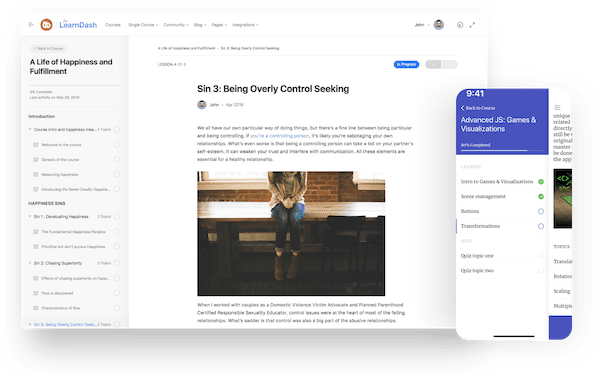
LearnDash, in my opinion, is pretty much the gold standard for serious WordPress learning management system (LMS) plug-ins and the recent release of version 3.0 has made it even better. It is a very feature rich platform that was clearly developed by people serious about e-learning (and the founder, Justin Ferriman, does have a long background in e-learning).
Pricing starts at $159 for the basic version and tops out at $329 for the Pro version. Note: These are one-time, not monthly fees and they represent an insane amount of value for what you get. To continue getting updates and support, there is an annual renewal fee that is half of the initial license fee.
Once you’ve got a license, LearnDash offers a range of integrations and add-ons –WooCommerce, bbPress, Stripe, and Zapier, among many others – for free. And there are also a number of premium add-ons – including a connection to the GrassBlade LRS (for you e-learning geeks out there) – that look quite useful.
Overall, this is serious e-learning at a very reasonable price. (BTW – If you are going to go with LearnDash, I suggest using it in combo with BuddyBoss to add great membership/community capabilities.)
AccessAlly
If you want to combine the ability to sell online courses with the ability to manage a full-featured membership site – a powerful combination for edupreneurs – then AccessAlly is arguably the best choice there is.
The platform really leverages the full capabilities and flexibility of WordPress while also adding in great membership features and a learning management system (LMS) plug-in that includes notable features like the ability for students to submit homework assignments and get private feedback.
You get all of this without having to be a WordPress whiz. It’s basically plug-n-play, but there is also a comprehensive “done for you” option is you want to get up and running with a course and membership site quickly.
The Pro plan is $129 per month / $108 with a yearly subscription. If you are serious about a membership model, this is definitely one to check out. (Full AccessAlly Review here.)
Link: https://accessally.com/
Course Cats
David Siteman Garland, the guy behind Course Cats, definitely knows what he is talking about when it comes to online courses. He has created quite a few successful ones himself and has taught many others how to do it.
Course Cats was born out of his own frustration with trying to make WordPress – which is great for so many things – into an easy-to-use platform for hosting online courses. Now you get to benefit from his efforts. As the Garland puts it, Course Cats gives you “everything you need to create your own amazing course Web site without needing a web developer, a graphic designer, a psychiatrist and a team of 1,000 nerds!”
A subscription is $59 per month or $497 a year – and either includes a “concierge” service to get you up and running. If you use, or plan to use WordPress, definitely take the 30-day free trial for a spin. (Full Coursecats review here.)
Link: http://coursecats.com

LifterLMS
LifterLMS has the very strong selling point of being free for the base version: you can search for and install it using the usual plug-in screen in WordPress. This means you can easily try out the system within your WordPress site before deciding whether it is right for you.
You pay only if you decide to use any of the various add-ons available for the system. These range from e-commerce to various marketing tools and integrations. These are $99 each, or you can purchase a Universal Bundle for $299 that includes all of the standard add-ons. (You can actually try out the Universal Bundle for a month for $1.)
Link: https://lifterlms.com/
Marketplace Online Course Platforms

These are online course platforms that, in addition to providing ways to author/assemble courses, also provide an existing marketplace in which to sell online courses. I’ve only included what I consider to be the top contenders here. For more extensive list of options in this category, see Looking for an Alternative to Udemy?
OpenSesame
If you happen to be an expert, or manage experts (e.g., if you represent a training firm or association) that is developing offerings at this level of sophistication,OpenSesame might be the first place you want to check out. You can also upload video, and the company claims that courses published in its system can be accessed by any learning management system (LMS). So, for example, if you know there are businesses out there that would want your content, but are going to want it on their own LMS, this could be a very powerful option. The company takes 40% of any sales you make through its platform.
Skillshare
Skillshare provides instructors with tools to create courses composed of video lessons and a “class project.” (All classes are have these two elements.) Classes are normally 10-25 minutes long, broken down into short videos, and they are all pre-recorded and self-paced. Once you have enrolled more than 25 learners in a class, you become eligible for participation in Skillshare’s Partner Program and can earn money through the royalty pool managed by the company – usually $1-2 per enrollment, according to the company. (Unlike Udemy – discussed below – Skillshare sells subscriptions to all of its content rather than to individual courses.) Once you are a partner, you’ll also get compensated for new Premium Members ($10 per) you bring to Skillshare through your Teacher Referral link. The Skillshare site reports that “Top teachers make up to $40,000 a year.”
Udemy
The folks at Udemy say “Our goal is to disrupt and democratize education by enabling anyone to learn from the world’s experts.” From what I can tell, they have been doing a pretty good job at it. The Udemy platform gives subject matter experts a simple, straightforward way to assemble content like PowerPoint slides, PDF documents, and YouTube videos into a coherent course experience. You can then publish into the Udemy marketplace and use a variety of tools to promote your masterpieces. Udemy is free for instructors – the company makes it’s money by keeping 50% if it sells your course. If you make the sale, you keep 97% (Udemy takes a 3% transaction fee). Keep in mind that your are currently required to price your courses in $5 increments between $20 and $200 on Udemy (source) – quite restrictive, in my opinion. Even so, ThinkTraffic reports that some some instructors have been having quite a bit of success.
(Again, see my post Looking for an Alternative to Udemy? for other options in this category.)
Small Business – Extended Enterprise Platforms

Most of the online course platforms listed on this page are geared towards solopreneurs or small, start-up businesses. While they can work for larger businesses, I’ve found over time that more established training and education companies may want to jump up to a different level if they:
- Sell business-to-business and may need to set up separate portals for each customer
- Need to award continuing education credit learners
- Already have an extensive catalog of courses built out in SCORM or TinCan-based authoring tools like Articulate, Captivate, Lectora, or iSpring
- Plan to build out a catalog of courses and don’t want to be “trapped” by using proprietary LMS tools
- Need to manage online and classroom-based courses in the same system
- Need complex assessment capabilities (creating questions and answer pools, randomizing questions, ability to analyze the performance of individual questions – i.e., item analysis)
Because many course sellers do have these needs, I decided to create a separate “learning management system for small business” page.
On my short list in this category are platforms like LearningCart (full review) and TalentLMS (full review). For a full range of options, check out Learning Management System for Small Business.
(Note: The online course platforms listed on that page are not out of the question for solo entrepreneurs, but they are probably a better fit, in most instances, for small-to-mid-sized businesses that are doing/planning a relatively high-volume of course sales (or big businesses, but those aren’t really a target for this site).
Also, if you happen to represent a trade or professional association, be sure to check out the LMS reviews on ReviewMyLMS.
Moodle Plug-Ins /Add-ons to Sell Online Courses
These will tend to apply more in academic or academic-oriented markets where platforms like Moodle and Canvas have a big foothold, but they will also be helpful to commercial edupreneurs who have adopted these platforms. Also, if you need a platform that can handle multi-byte (e.g., Chinese) or right-to-left (e.g., Arabic) language, Moodle may be your best bet.
CourseMerchant
If you happen to have already gone down the Moodle path (widely used open source LMS) for your course delivery needs, then you may want to check out CourseMerchant. While Moodle itself provides a very basic e-commerce option, CourseMerchant helps you take things to a much more sophisticated level – including the ability to bundle courses, offer discounts, and sell multi-seat licenses that allow for the seats to be easily allocated to learners. The CourseMerchant folks are also behind CourseIndex.com, a network that enables you to promote and sell online courses through affiliate marketers.
LMS Checkout
LMS Checkout is another option for selling Moodle or Totara courses. You can set up an account easily on the LMS Checkout Web site, download the plugin to install into your Moodle or Totara site, and connect to Paypal or Authorize.net to as your payment gateway. You get quite a bit of control over modifying the the theme for you e-commerce site so that it will look as much like your Moodle site as possible and you can even integrate with Salesforce in just a few clicks. All-in-all, a very good option for getting a level of e-commerce functionality that just isn’t available in Moodle itself.
Next Steps for Choosing a Platform
What now?
If you haven’t already, definitely grab the free selection guide for online course platforms. It costs nothing, and it will help you make the right choice faster and smarter.
You may also want to check out the individual reviews of top course platforms that have been published here on Learning Revolution. This also includes comparison of online course platforms like Teachable vs Thinkific. The LMS reviews on ReviewMyLMS are also very helpful as these come from actual users.
As you are considering your options, be sure that you are clear about what type of online course business you are. It really does matter when selecting a platform.
Next Steps Once You Have a Platform
As you probably realize – having a platform doesn’t do you a lot of good if you don’t know how to create an online course – just follow the link to get my guidance on how to design an online course.
And then, of course, there is the whole issue of how to launch your online course successfully.
Finally, be sure to check out the free Learning Revolutionary’s Toolbox. It’s chock full of tools and tips to help edupreneurs with all aspects of creating and growing a successful online course business.
See you at the Revolution!